Your booking app knows your schedule. It doesn’t know whether it pays you.
Enter your costs, your hours, your goal and your services. In about 15 minutes, see what each treatment really earns you per hour, the price your goal needs, and how many appointments a week get you there.
Booked but broke is a real thing. It isn’t a character flaw.
A busy calendar tells you one thing: people want what you do. It does not tell you whether each of those appointments — after product, after the fifteen minutes to reset the room, after the processing fee, after the rent that arrives whether or not anyone books — actually moves you toward the number you need to pay yourself.
That is why so many good estheticians describe the same feeling in almost the same words:
“Fully booked but still broke.”
“Why am I booked but not making any money?”
“Parked at $5k, $7k or $9k months and I can’t figure out why.”
The usual answers don’t help. “Raise your prices” — to what? “Get more clients” — how many? “Know your numbers” — which numbers, and where do they come from?
Your booking software isn’t built to answer this. It records appointments and takes payments. It doesn’t know your rent, your product cost per facial, your turnover time or the income you’re aiming for — so it can’t tell you whether your prices and your hours add up.
The Esthetician Profit & Pricing Engine is built to answer exactly that.
The Esthetician Profit & Pricing Engine
A small, guided tool that turns your own numbers into the three answers your calendar can’t give you.
You enter what you already know: what your studio costs you each month, what you want to take home, the days and hours you see clients, and your services — how long each takes, what the product costs, what you charge.
The engine works out your hourly bar: the amount every booked hour has to earn for your goal to be reachable in the hours you actually plan to fill. Then it holds each service up to that bar.
After about 15 minutes you will know:
After product, turnover time and processing — and whether it clears your bar (green), sits just under it (amber) or falls well short (red). This is what the service contributes after its own costs, not what you personally take home.
Shown as a suggestion next to your current price. The math is visible; the decision stays yours.
At today’s prices and at the suggested ones — and whether that fits inside the hours you have.
It also shows where the money is leaking (up to three plain-English findings), and lets you test one pricing move at a time — the suggested prices, or a 5, 10 or 15 percent increase on today’s prices — and what a slow or busier month does to the gap. Nothing you try touches your real numbers.
Everything it shows is a planning estimate built from what you enter. It isn’t accounting, it isn’t tax advice, and it doesn’t know your market — it knows your numbers.

What it looks like on a real-looking studio
Maya has been solo for three years. She rents a suite, works four days a week, and does about 70 appointments a month. Her calendar looks healthy. Her take-home doesn’t.
She enters her studio costs ($1,300 a month), the take-home she wants ($4,500 plus a small reserve), her own tax set-aside assumption, and her hours. The engine tells her that in the hours she plans to fill, every booked hour needs to earn about $85.
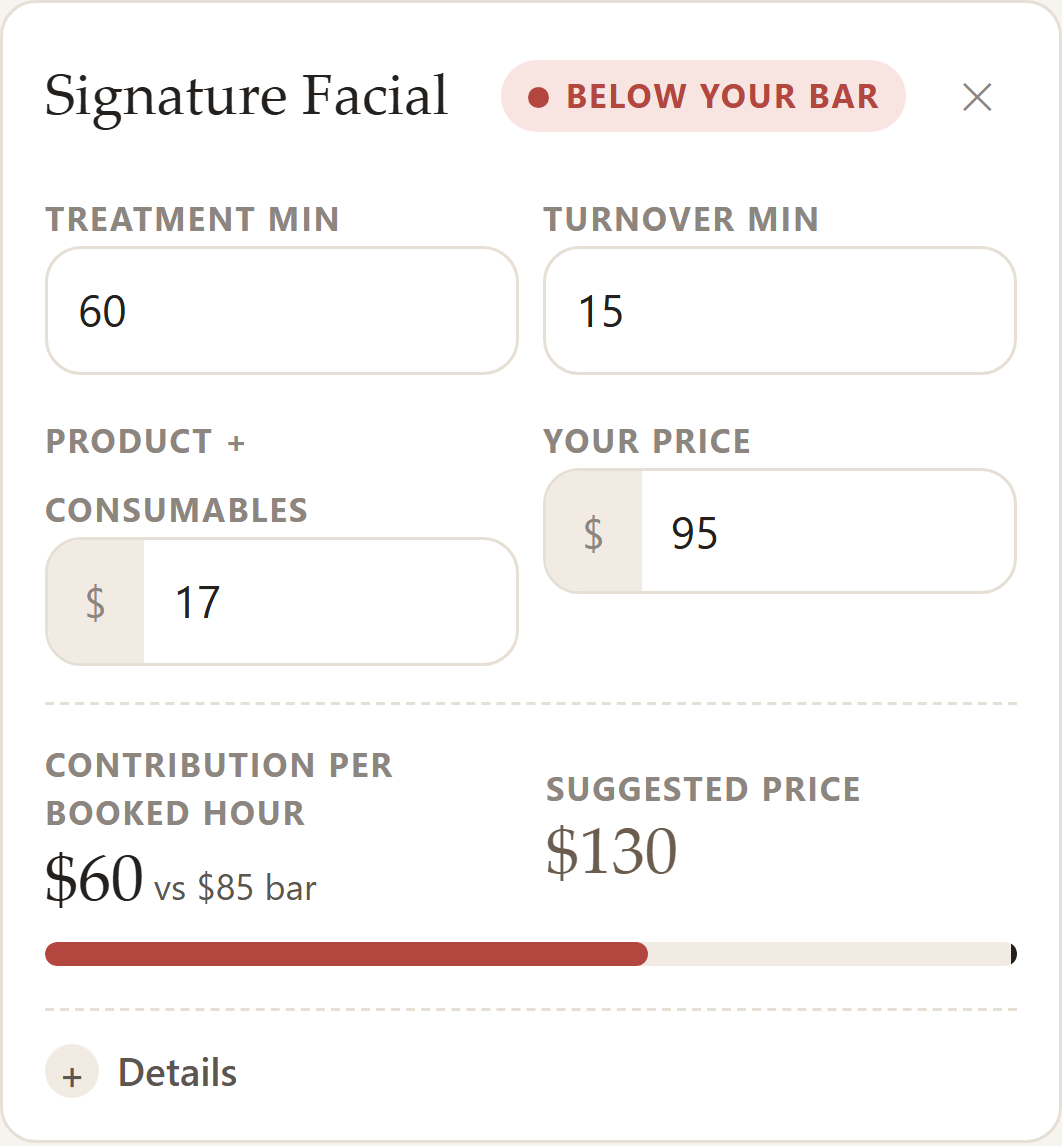
Then she enters her services. Her Signature Facial is $95. It contributes about $60 per booked hour after product and processing, with treatment and turnover time included in the booked hour — that’s what the service contributes, not what she takes home. Red. The engine shows the price that would clear her bar: $130.
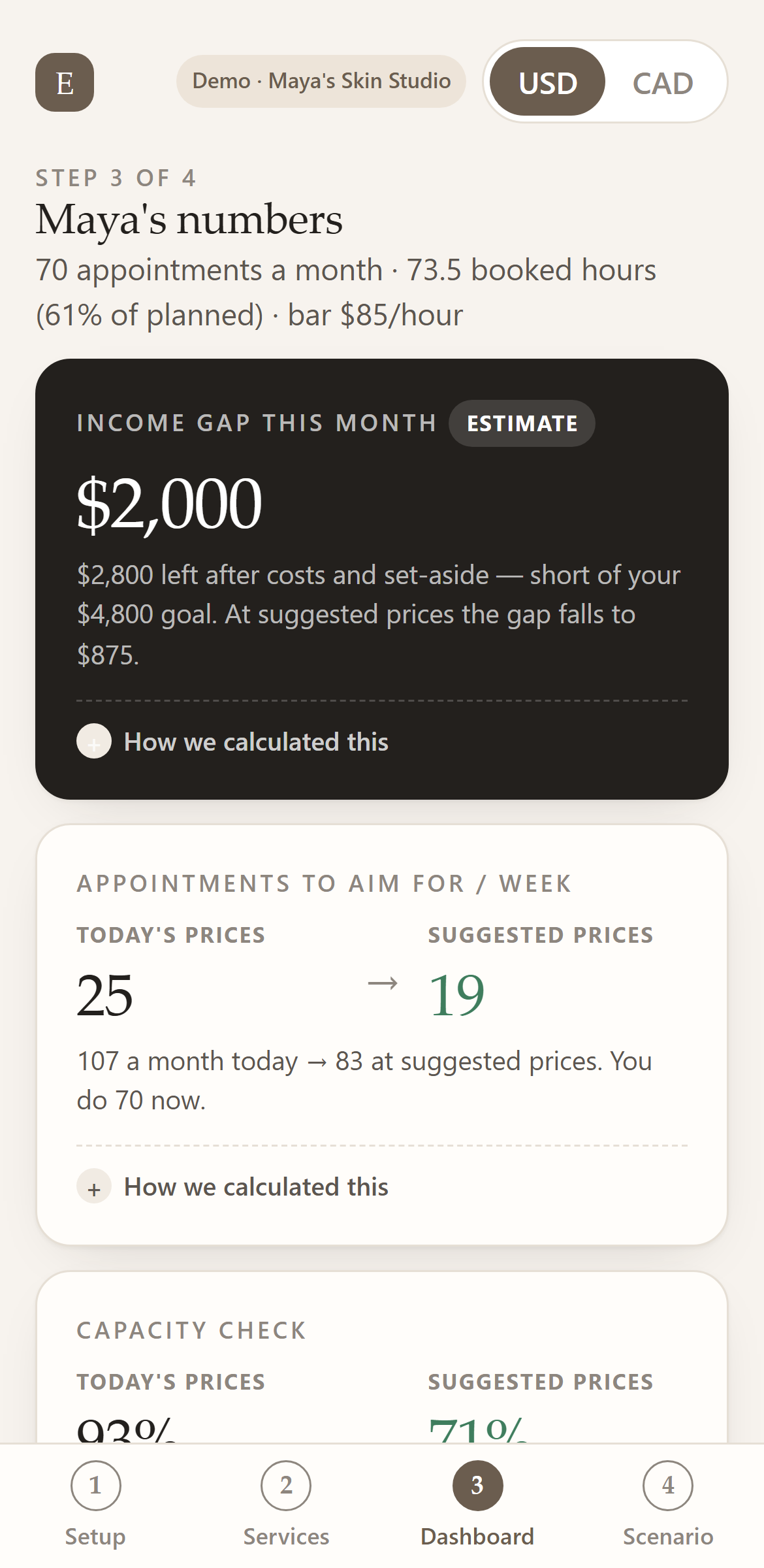
Her dashboard puts the month together. At today’s prices she is about $2,000 short of her goal. Reaching it at today’s prices would take about 25 appointments a week — 93% of the hours she has.
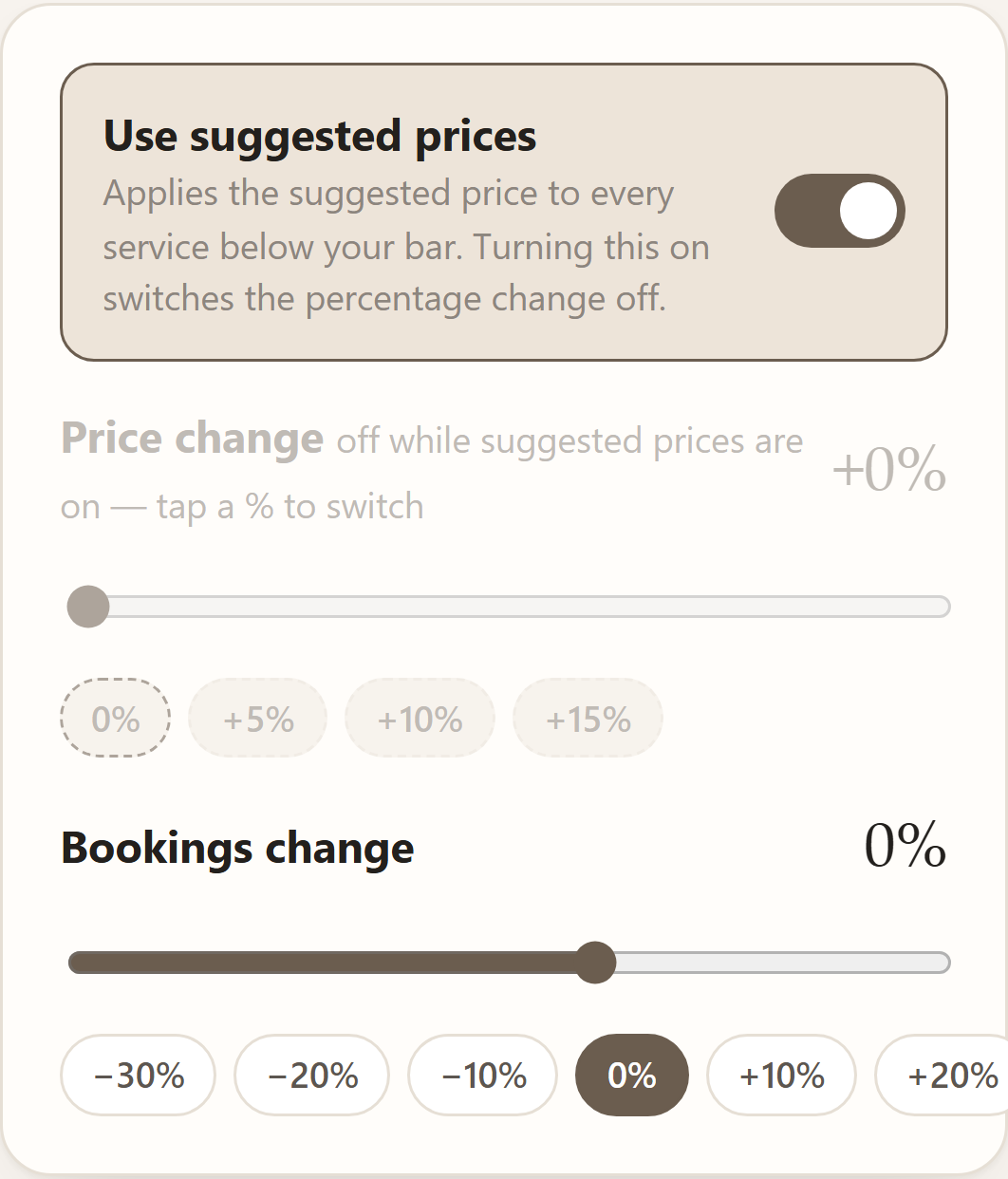
She taps Apply suggested prices. Same clients, same hours: the gap falls to about $875, and the goal now needs about 19 appointments a week — 71% of her hours.
Nothing about her skill changed. Only the arithmetic became visible.
The scenario assumes her bookings don’t change when her prices do. The engine can’t predict how clients react — it says so on screen — and the Price Increase Playbook covers phasing and timing.
After one sitting, you’ll know
Ranked by what they contribute per booked hour, not by what they charge.
And whether a short service works better as an add-on than a stand-alone booking.
Shown next to your current price, with the math one tap away.
To hit your income goal — and how many at the suggested prices.
Or whether you’d need more hours than you have.
One pricing move at a time — the suggested prices, or today’s prices up 5, 10 or 15 percent — and bookings down 10, 20 or 30 percent in a slow month.
Up to three findings in plain English, biggest first.
About 15 minutes. No spreadsheet skills.
- 1
Your studio
~6 minEnter your monthly fixed costs in five simple buckets, what you want to take home, your own tax set-aside percentage, and the days and hours you see clients.
- 2
Your services
~5 minPick from presets or add your own — minutes, turnover time, product cost, your price. Up to eight. Each one gets a contribution-per-booked-hour number and a colour as you type.
- 3
Your numbers
~4 minRead the dashboard, tap Apply suggested prices, and try the scenarios. Come back monthly with the Numbers Night Checklist.
Start with the built-in demo studio if you’d rather look before you type. Your data stays in your browser — no account, nothing uploaded. The 15 minutes assumes you have your basic numbers ready (the Quick Start Guide lists the four to find first).
What founders receive
The interactive tool: Setup, Services, Dashboard and Scenario Planner. Works on your phone or laptop. USD or CAD display.
The four things to have on hand and a one-page walk through the screens, so the first sitting takes 15 minutes rather than an evening.
A short screen recording showing every screen with the demo studio, then with a blank one.
How to read your suggested prices, when to raise in one step and when in two, timing, and how to handle the three objections you’re most likely to hear.
A 15-minute monthly routine so the engine keeps earning its place after the first evening.
Three things that look similar, and aren’t
It knows who is coming at 2 p.m. It does not know what that appointment costs you in product and turnover, what your rent works out to per booked hour, or how far the month is from the income you want. It isn’t supposed to.
If you already keep one, keep it. A tracker records what happened. It doesn’t tell you what a 60-minute facial needs to cost in your studio, or how many facials next week would close the gap — unless you build that logic yourself.
Pricing frameworks, hourly-rate formulas, mindset. Useful, and still yours to apply afterwards, with your own numbers, on your own time.
Your costs, your hours, your goal and your services go in; contribution per booked hour for each service, the price each one needs, and the appointments a week that reach your goal come out. It doesn’t replace your booking app or your accountant. It sits in the gap between them.
Founder access — $37
A working version of the Esthetician Profit & Pricing Engine is already built and is now being prepared for release. Before it launches at its intended price of USD $47, a first group of estheticians can get it at the founder price of USD $37.
Founder pricing is straightforward: you’re buying before the reviews exist, so you pay less. In return, you get in first, you get the full tool plus the four guides, and your feedback shapes the first update. There is no countdown and no cap we’d invent to hurry you; the founder price ends when the launch version ships.
What happens after you buy
Confirmation email with your receipt and your delivery date.
Delivery email with your link to the engine, the Quick Start Guide, the walkthrough video, the Price Increase Playbook and the Numbers Night Checklist.
Your 14-day trial period starts on the day of that delivery email, not the day you buy.
- The Esthetician Profit & Pricing Engine
- Quick Start Guide · Walkthrough Video · Price Increase Playbook · Numbers Night Checklist
- Delivered by email within 21 days of purchase
- 14 days after delivery to decide — full refund if it isn’t useful
- Founder feedback shapes the first update
One-time payment · USD · works in US and Canada · delivered within 21 days
Try it for 14 days after delivery
Try the Esthetician Profit & Pricing Engine for 14 days after delivery. If you decide it isn’t useful for your business, reply to your delivery email within that period for a full refund. No form, no reason required.
This is for you if — and not for you if
This is for you if
- You’re a licensed solo esthetician in the US or Canada — suite, rented room or home studio.
- You already have paying clients and a month or two of history to enter.
- You control your own pricing, and you suspect your prices or your volume don’t quite support what you want to earn — you’d rather see the numbers than keep guessing.
It is not for you if
- You’re still in school or pre-licence — there’s nothing to enter yet.
- You haven’t started serving clients — the engine works from real costs and real prices.
- You run a salon with employees and need payroll, commission or multi-provider analysis — this is built for one pair of hands.
- You need tax or accounting software — this is a planning tool; it uses a set-aside percentage you choose and never calculates tax.
Questions estheticians ask
Is this accounting software?
Does this calculate my taxes?
Is this a spreadsheet?
Does it replace my booking software?
Does it store my business data?
Does it work in the US and Canada?
What if my current prices are already sustainable?
How long does setup take?
When do founders receive access?
Can I test suggested prices and a percentage increase at the same time?
What if I change my prices and clients react?
What is the refund policy?
How do I reach you?
Find out whether your calendar actually pays you.
You don’t need more information. You need to see your own numbers laid out clearly enough to make a decision — what each service really earns, what it needs to cost, and how many appointments a week get you to the income you want.
That takes about 15 minutes, and it’s yours to try for 14 days after it arrives.